


RAID Spring Cleaning Tips
By Mike Cobb, DriveSavers Director of Engineering
April is officially Spring Cleaning Month.
Take some time to pay a little attention to your servers with some important maintenance. How many of these suggestions do YOU already follow? Is there anything you’ve missed?
Back Up (obviously)
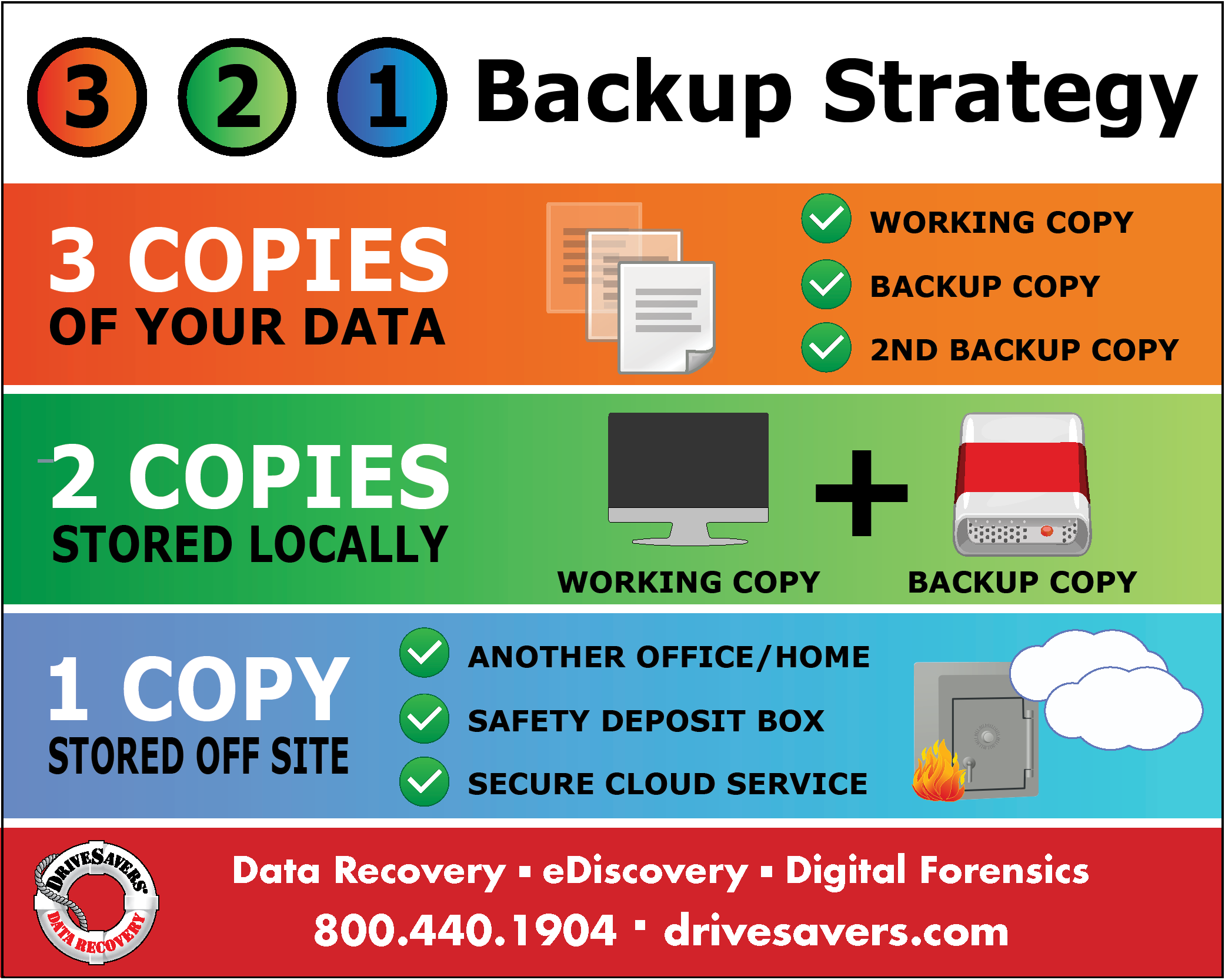
We always recommend triple redundancy, meaning that the same important data is located in three places—one working copy and two backups.
- Prepare at least two backup copies of anything important
- Save copies of data in at least two different places
- Store one copy off-site or in the cloud in case of theft, fire or other disaster
- Make sure your data is backing up to the correct location(s)
- Do not back up to the same device that holds the data you want backed up—save a copy to an entirely different device
Verify Your Backups
All drives eventually fail, including backup drives. It’s a good idea to check and make sure this hasn’t happened.
- Verify that your automated backups are functioning correctly and on-schedule
- Open a few critical files on each backup device/location to verify that the devices are operational and files are not corrupted or otherwise unusable
Take Inventory
It’s important that you understand any system that you manage. Take the time to identify every RAID, each of their configurations and what state each system is in.
Here are some very important questions you should answer:
- How many RAID configurations are located on your server and what types are they?
- Are all RAIDs currently in an optimal state? Are any already in a degraded state?
- How many drives is the system reporting?
- Does your server run predictive failure analysis? If so, when was the last time it ran and what were the results?
Check Disk Space
Filling your system to 100% of disk capacity could cause your server to stop responding and data to become corrupt or lost. In addition, old software installations could offer loopholes for hackers to enter. A smaller load of data also makes the system run more efficiently and faster.
Before deleting anything from your server, review any industry regulations your business must follow, such as HIPAA for medical data or GLBA for banking data. If you can do so without violating any industry compliance regulations, delete or archive the following:
- Old logs
- Old emails that are no longer needed
- Old software and versions of software that are no longer used
- Duplicate data existing in the same space
- Old user accounts that are no longer used
Automate Your Updates
Within minutes of an operating system (OS) security flaw being disclosed, hackers are scanning for vulnerabilities that they can use to infiltrate unupdated or otherwise unprotected systems.
- If you don’t already have updates automated for your operating systems, installed software and applications including web applications, put that in place now.
- First, check for and install any available updates, particularly to your operating systems and any anti-malware or antivirus software.
- Of course, back up first and often to protect your important information assets.
Check Remote Access/Tools
If your system is off-site with a service provider or co-location service, you should check your remote access periodically to make sure you can communicate with the system when you need to. If you can’t connect, you’re doomed.
Change Passwords
We all know that passwords should be changed periodically. Incorporate this into your spring cleaning. Make a schedule to change passwords in the future and stick to it.
- Changing passwords every six months to a year seems to be what the experts are recommending. More frequent changes are not needed if you have strong passwords.
- Passwords should have at least 12 characters—a mix of capital and lower-case letters, numbers and symbols.
- Don’t use the same passwords for different systems.
If you need help remembering your passwords, try a password manager program.
12 Tips for a Stronger Password
Conduct a Risk Analysis
Cybercriminals are becoming more and more advanced as businesses rely more and more on electronic data storage. It’s a good idea to update yourself on current risks and review your systems to be sure they are protected.
Learn how to conduct a risk analysis.
Relax After a Job Well Done
Now that you’ve completed your spring cleaning chores, sit back and enjoy knowing that your systems are better protected from hackers, data loss and other nasty surprises.

 English (United States)
  English (Australia)
  French (France)
  English (UK)
  French (Canada)
  English (Canada)
  Spanish (Mexico)
  German
  Dutch
Dutch  Italian
  Finnish
  Polish
  Norwegian
  Swedish
  Danish
  Spanish (Spain)
  Chinese
  Japanese
  German (Austria)