


Revealing the Silent SSD Killer: Death by Dust

In the world of computer technology, we often marvel at the sleek and sophisticated design of our favorite gadgets, but beneath their polished exteriors lies a hidden danger that can bring even the mightiest machines to their virtual knees. Dust, seemingly innocuous and ever-present, can silently wreak havoc on our devices, even solid-state drives (SSDs).
While DriveSavers can typically recover data from the most devastated devices that have been dragged through flood, fire, and other catastrophes, today, we are delving into the dusty depths of a common but often overlooked issue that can render an SSD unrecoverable. Join us as we explore the grim consequences of neglecting the cleanliness of data storage devices.
The Unseen Culprit
Dust is a silent killer to solid-state drives. It can build up inside your computer case, clogging the vents and fans. This can lead to overheating, which can damage the delicate components of your SSD. But that’s just the start.
It’s a problem that can be summed up in three words: “Death by Dust.” While it may sound like a dramatic exaggeration, the evidence we’ve gathered tells a different story.
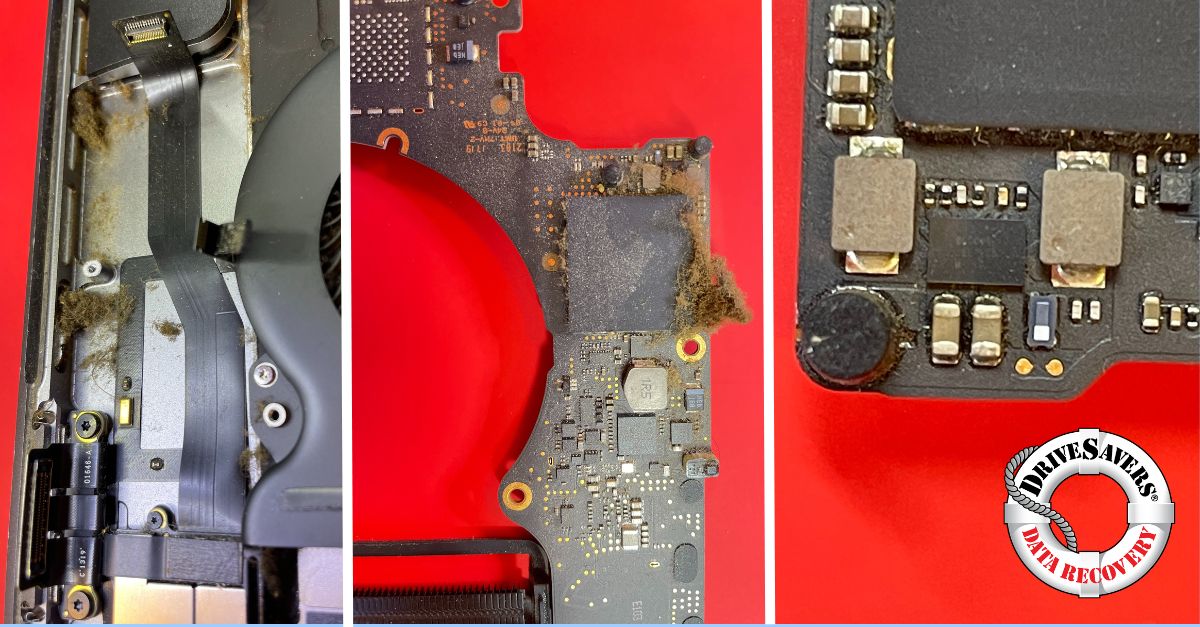
We took some shocking photos of this silent killer in action, which, unfortunately, is not uncommon. These images showcase an SSD’s worst nightmare – a logic board caked in layers of dust and debris, with a critical chip that has failed from excessive heat. This damage is severe enough that the data on this SSD is unrecoverable.
But here’s the kicker: it doesn’t take extreme contamination to induce SSD failure; even a moderate buildup of dust can spell disaster.
The Hidden Dangers
Debris accumulation inside the housing of your SSD can lead to a host of problems. It can create static electricity, which can cause components to malfunction or break entirely, block airflow, which can cause overheating, or trap ambient moisture, leading to corrosion. Short circuits are another common consequence.
A critical issue arises when dust settles near the voltage regulator for the SSD, as was the case in the photos we captured. This seemingly harmless dust can, over time, cause components to fail and may ultimately render your precious data unrecoverable.
SSD Data Recovery Technology Used by DriveSavers
DrivesSavers engineers encounter this issue so frequently that it became one of the driving forces behind our investment in X-ray technology. This technology allows us to visualize the structures within the NAND packaging and helps us to identify the exact source of the problem. Utilizing X-ray technology, we are working towards a technique to resolve failures within the internal structures of a NAND and of other chips critical for data recovery.
Another method to identify the source of failure utilizes thermal imagery. The thermal image GIF shown here is an example of a short circuit in a failed NAND.
While the photos we are sharing showcase an extreme case of dust-induced SSD failure, it’s essential to note that often, the threat is much more subtle – if in the wrong location, even a small speck of dust can cause catastrophic failure and data loss.
Prevention: Steps You Can Take
Here are a few things you can do to prevent dust damage from occurring:
- Regularly use compressed air to clear the vents, keyboard, and other parts of your device.
Note: don’t use a vacuum, as static buildup may result. - Wipe your computer down with isopropyl alcohol to keep it clean.
- Use an air filter near your computer or external device.
- Keep pets away from your computer.
- Keep your computer elevated and provide space around the device to allow ventilation.
- Whenever possible, avoid using your computer in hot, humid, dusty, or smoky environments.
By following these tips, you can help to protect your SSD from dust damage. If you do experience a dust-related failure, contact DriveSavers Data Recovery for a free evaluation.
Conclusion
The next time you power up your high-tech gadgets, spare a thought for unseen dangers. Dust may seem harmless, but as our photos and experiences have shown, it can be a silent assassin, leading to SSD failure and data loss. It is worth noting again that this issue is more common than you might think.
As computer technology continues to advance, it’s crucial to remain vigilant about keeping your devices clean and well-ventilated. Regular cleaning and maintenance can go a long way in preventing the catastrophic “Death by Dust” scenario.

 English (United States)
  English (Australia)
  French (France)
  English (UK)
  French (Canada)
  English (Canada)
  Spanish (Mexico)
  German
  Dutch
Dutch  Italian
  Finnish
  Polish
  Norwegian
  Swedish
  Danish
  Spanish (Spain)
  Chinese
  Japanese
  German (Austria)