

A Ransomware Incident Damaged Your Backups. The Data May Still Be There.

Most ransomware recovery plans assume the backup repository is either usable or it isn’t. Restore from it, or don’t. That either-or view is where recoverable data gets lost, because a repository that fails a conventional restore has not necessarily lost its contents. Encrypted files still occupy the disk. Deleted files often survive in place until the filesystem reallocates their blocks. Partially damaged backup sets frequently contain far more recoverable data than the backup application can see.
Whether any of that can be recovered depends mostly on what happens to that storage in the first few days after an attack.
In one Akira ransomware case, roughly 15TB of new data was written to a backup volume the day after the attack, into blocks the deleted backups still occupied. DriveSavers still recovered 99.91% of the priority database server. Engineering analysis found that substantially more of the affected data, and potentially all of it, could likely have been recovered if nothing had been written to the volume.
The Short Version
Treat a backup repository that fails to restore as potentially recoverable until it has been assessed.
Stop writing to damaged storage, and restore onto clean, separate storage instead.
Image or snapshot damaged volumes before running any tool against them.
Before an incident, name one person who decides whether damaged storage is preserved or reused.
Score a recovery on two lines: data returned, and systems running.
Why Backups Fail During Ransomware Recovery Efforts
Roughly half of the récupération des données des ransomwares cases DriveSavers has handled over the past two years involved attackers targeting Veeam backups specifically before touching the primary servers.
Attackers target backups because a victim with working backups can refuse to pay, while a victim without them has a deadline. Backup systems also make the attackers’ job easier. Service accounts often hold broad rights across the environment by design, and repositories announce themselves through named shares and recognizable VBK and VMDK files (backup archives and virtual machine disks).
When attackers hit the backup repository first, the backups may already be damaged by the time anyone tries to restore from them.
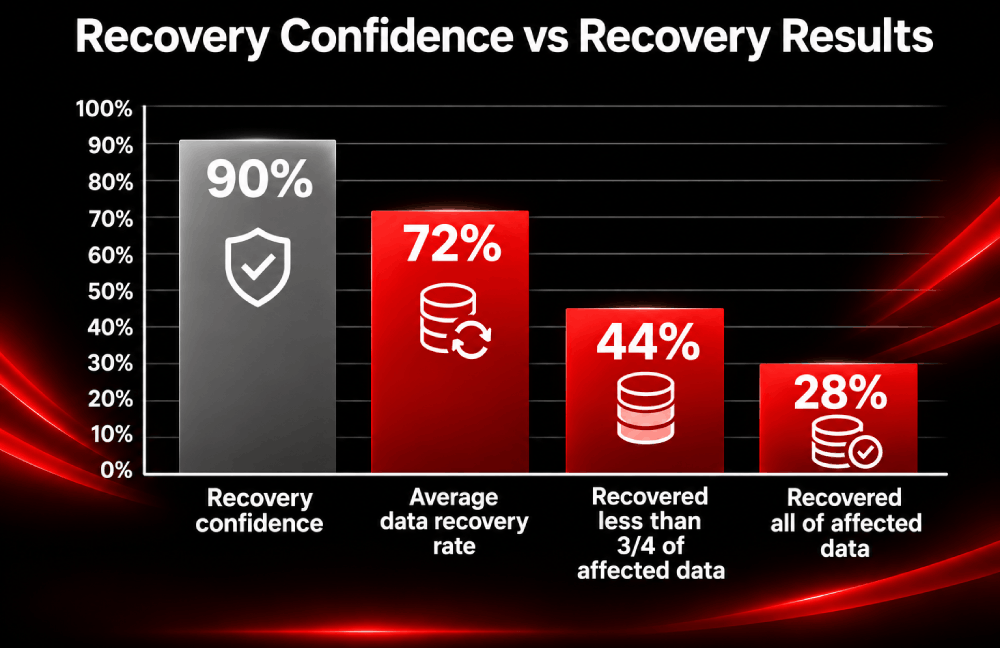
Veeam’s Data Trust and Resilience Report 2026 measures the gap between confidence and results. Of the more than 900 senior IT, security, and risk leaders it surveyed, 90% were confident they could recover from a cyber incident within their defined recovery time objectives. Among organizations hit by ransomware that affected operations or data, 28% fully recovered all affected data, and 44% recovered less than 75% of it. On average, organizations recovered 72% of affected data.
Those numbers suggest that many ransomware plans assume the backups will work when they are needed.
Once attackers reach a repository, they usually delete rather than encrypt, because deletion is faster. Encrypting 40TB takes time and generates load. Deleting the same 40TB takes seconds and produces the same practical result from the victim’s point of view.
The distinction matters because a deleted backup is often still intact on the disk until something is written over it.
Immutable backups help, and DriveSavers recommends them. They can prevent ransomware from altering or deleting stored data, but they do not protect the backup software or the credentials that manage it. A plan that relies on immutable backups should still say what happens if the software or credentials that manage them are compromised.
Two Cases, One Pattern
A Multi-Site Enterprise on VMware
This is the Akira case described above. Backups on a Nakivo repository were encrypted or deleted, and production was encrypted at the same time. Recovery on the priority database server reached 99.4% from the backup repository alone and 99.91% after merging unencrypted regions of the production virtual disks. The Akira ransomware recovery case study covers the technical work in detail.
An Independent Law Firm
The attack encrypted Microsoft SQL Server databases, Veeam backup files, and VMDKs, and the Veeam files were deleted from the NAS. Working remotely, DriveSavers reconstructed the deleted backup files. SQL Server database restoration reached 99%, and virtual machine data was recovered at an average of 98%. The SQL Server recovery case study covers the work in detail.
Different backup products (Nakivo and Veeam), filesystems (BTRFS and ReFS), NAS vendors (Synology and Thecus), and delivery models (in-lab and remote). The same pattern: production encrypted, backups deleted or partially overwritten, and a conventional restore that could not complete.
In both cases, the client’s incident response firm made the referral to DriveSavers.
What Gets Destroyed, and How
The actions that destroy recoverable data usually look like reasonable next steps to an infrastructure team working under pressure.
Depending on the environment, they include:
Restoring new virtual machines onto damaged backup volumes;
Copying large volumes of production data onto damaged repositories;
Running consumer recovery utilities against the damaged volume;
Reformatting or reinitializing storage;
Deleting encrypted files;
Running aggressive filesystem repair utilities;
Rebuilding RAID or storage configurations without preserving the original state; or
Performing cleanup processes that alter filesystem metadata.
Every one of those is defensible in isolation. Several are standard practice. The problem is that they all write to storage that may hold the only remaining copy of the data, before anyone has assessed it.
Why Writing to Damaged Storage Is Different
Encrypted data is still on the disk. Depending on the circumstances, it can be recovered through decryption or reconstruction. Overwritten data cannot be recovered from that disk, only from a copy stored somewhere else.
Most decisions made during an incident can be changed later. Negotiation strategy can shift, systems can be restored in a different order, and the scope of the response can grow. Writing to damaged storage cannot be undone.
How to Restore Without Destroying Recoverable Data
Restoration and preservation can run at the same time, as long as restoration never writes to the storage that still holds recoverable data. That comes down to five steps.
Ransomware Recovery Time, by Phase
Ransomware recovery time depends on several phases, and each one moves at a different pace.
Timing serves as the key takeaway for practical planning: delaying an evaluation request fails to accelerate the recovery process and only limits the volume of retrievable data.
The Measurement Problem
Leadership teams routinely underestimate recovery viability by scoring whether systems boot.
Booting is a narrow dependency chain. A virtual machine has to find filesystem metadata, partition information, boot records, operating system files, registry and configuration data, authentication databases, application configuration, database structures, and its infrastructure dependencies all in working order before it will start. Break any link, and the machine stops, no matter how healthy the rest of the disk is.
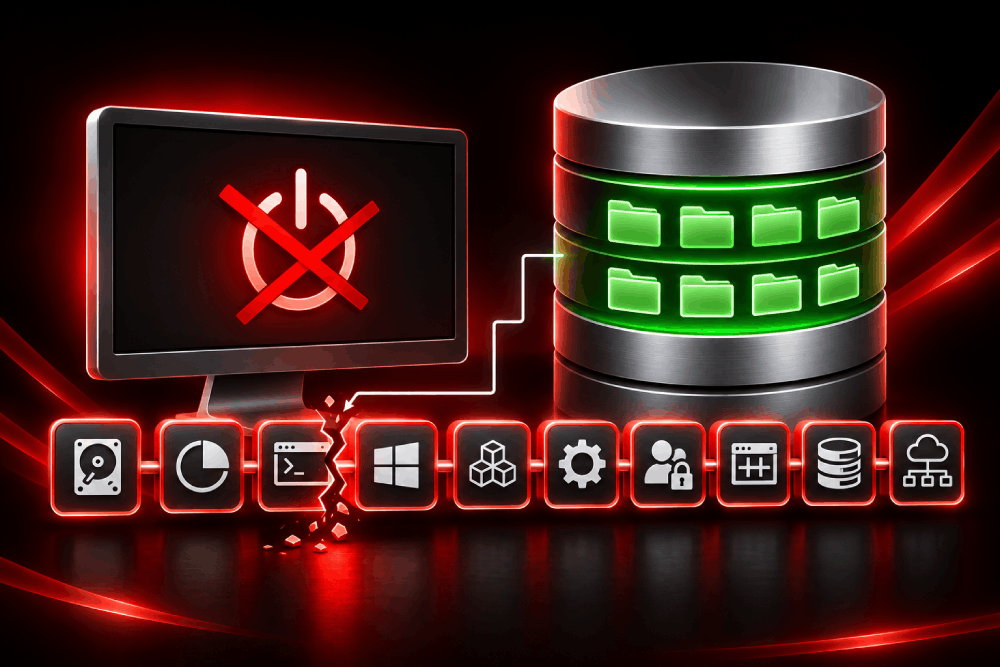
An organization’s entire application dataset can sit intact behind a handful of damaged boot blocks. That data can be mounted from another host, exported into a rebuilt environment, or used to reconstruct databases and business records directly.
The Akira case shows the difference. DriveSavers advised the incident response firm and the client that reconstructed virtual disks could not be guaranteed to boot. At least one recovered virtual machine booted. The rest were returned as recovered data and repaired disks, each with a block-level report showing which regions were sound and which carried unrecoverable damage, with object, file, directory, and byte counts. That report lets administrators judge the quality of each recovered image and decide whether it needs application-level recovery, file extraction, or a rebuild.
Evaluate success using two distinct metrics: the volume of data retrieved versus system bootability. Combining these into a single metric risks mischaracterizing a highly successful data retrieval effort as a total failure when insurers and incident response specialists evaluate the outcome.
The Questions Worth Asking Early
When attackers have compromised both production and backups, there are a variety of options, and the following questions will help shape what happens next:
Are the backups complete, and are their catalogs and metadata intact?
Has ransomware affected the backup repository itself as well as production?
Are portions of the damaged storage still physically recoverable?
Has anything been written to the damaged storage since the attack?
Can critical virtual machines be reconstructed where the backup application and normal administrative tools cannot restore them?
Which systems are needed to restore authentication, DNS, databases, and other dependencies?
How quickly can each recovery option return usable data?
Is payment being considered mainly because the backups appear unusable?
Backups appearing unusable and backups being unrecoverable are different findings, and only one of them is a reason to pay.
What to Add to a Ransomware Recovery Plan
A ransomware incident response plan typically covers isolation, communication, notification, and restoration. The gap is usually between isolation and restoration, where no one is assigned to determine what the damaged storage still holds.
Four additions close that gap:
Designate an Owner for Preservation Decisions
Assigning a single individual such as the CISO, head of infrastructure, or incident lead ensures that the choice to preserve or reuse damaged storage is made explicitly. Otherwise, the call defaults implicitly to whichever backup or storage administrator interacts with the drive first, placing an unintended burden on them.
Document Write-Restricted Volumes in Advance
Identify sensitive targets such as backup repositories, corrupted production LUNs, and snapshot storage that require explicit owner sign-off before write operations. Setting these boundaries early avoids urgent midnight disputes.
Integrate a Day-One Data Recovery Evaluation
Determining whether recovery is feasible upfront provides vital clarity to inform all subsequent restoration choices.
Establish Clear Criteria for Recovery Success in Advance
Evaluating success purely on system bootability can turn a critical data-saving effort into a perceived failure if 99% of data is retrieved without a bootable machine. Veeam’s findings emphasize that executive alignment on ownership, status reporting, and defining “successful recovery” is one of four capabilities the report consistently links to stronger recovery outcomes.
All four can be decided now, while nothing is on fire, with no new tooling or budget.
Où Specialized Data Recovery Fits
Specialized data recovery is a parallel workstream in ransomware attack recovery. It runs alongside the incident response team, the backup vendor, the forensic investigator, and the systems integrator, and matters most when those teams have run out of options.
Bringing in data recovery engineers is worth considering when backup restoration repeatedly fails, critical virtual machines are encrypted or corrupted, filesystems or RAID configurations are damaged, or essential infrastructure such as domain controllers, DNS servers, databases, or ERP systems cannot be restored.
In the Akira case, the client brought in its cyber insurance carrier and an incident response firm within days. Conventional restoration returned portions of the environment but could not recover several priority virtual machines, and so the incident response firm escalated to DriveSavers.


 English (United States)
 English (Australia)
 French (France)
 English (UK)
 French (Canada)
 English (Canada)
 Spanish (Mexico)
 German
 Dutch
 Italian
 Finnish
 Polish
 Norwegian
 Swedish
 Danish
 Spanish (Spain)
 Chinese
 Japanese
 German (Austria)